Billgami
For freelancers

A freelance invoice app that stays out of your billing hours.

Save client details once, drop in reusable service line items, and send a professional PDF invoice from iPhone. Estimate to invoice in one tap. Free tier plus a lifetime option ($249.99) if you want to skip subscriptions. Not accounting software.

Last updated · July 13, 2026

Invoice

Marin Repair Co.

Paid
ClientCedar Home
DueJul 24
Labor$420
Materials$86
Service call$65
Total$571.00
Share PDF

Billgami is a freelance invoice app for solo freelancers. It saves client details, lets you build a library of reusable project or hourly service line items, and sends professional PDF invoices from iPhone. One tap converts an estimate into an invoice. Billgami is free to start with a lifetime tier ($249.99) available if you want to skip subscriptions entirely. Billgami never processes payments or holds your money. Clients pay you directly through Zelle, Venmo, wire, check, or whatever method you already use.

50-word summary

For solo freelancers who invoice clients per project or per hour: save clients, save service items, send PDF invoices, convert estimates to invoices, track paid manually. Free tier plus lifetime option ($249.99). Not accounting software. Not payment processing.

PDF invoices from iPhone in under a minuteFree tier plus lifetime option ($249.99) if you want to skip subscriptionsProject or hourly line items, saved for reuse
01Sample

Sample invoice with real numbers

A filled-in example that mirrors what you would send a client. Every price is pulled from the industry data table below.

Invoice

Sample freelance invoice from Billgami

Invoice #

SAMPLE-0001

A minimal invoice for a two-week design project. Note the mix of project + hourly line items and the revision fee for out-of-scope changes.

DescriptionQtyRateTotal

Website design (project scope)

Landing page + 3 interior pages, per approved SOW

1$2,400.00$2,400.00

Revision hours (beyond scope)

2 additional hours of revisions requested

2$85.00$170.00

Rush fee

Timeline compressed to 10 days

1$300.00$300.00
Subtotal$2,870.00
Total$2,870.00
Example only. Line item pricing varies by market, job scope, and business. Confirm your own pricing before quoting a client.

Invoice

Sample freelance estimate before the project starts

Invoice #

SAMPLE-0001

The estimate for the same project, sent before work began. When approved, one tap converts it to the invoice above (revision hours and rush fee added at invoicing time).

DescriptionQtyRateTotal

Website design (project scope)

Landing page + 3 interior pages

1$2,400.00$2,400.00

Included revisions

Up to 3 rounds of revisions per page

1$0.00$0.00
Subtotal$2,400.00
Total$2,400.00
Example only. Line item pricing varies by market, job scope, and business. Confirm your own pricing before quoting a client.

Who this is for

Solo freelancers who send invoices themselves and want the fewest possible steps between finishing project work and getting paid.

  • Writers, designers, developers, consultants, and photographers
  • Tutors, coaches, translators, and other service-based freelancers
  • 1099 side-hustle earners who invoice occasionally
  • Full-time freelancers who invoice multiple clients per month
  • Anyone who says 'I just need to send an invoice' and does not want accounting software

Who this is not for

Billgami is scoped to a specific freelancer profile. If you fit any of these, a different tool fits better.

  • Freelancers with employees or subcontractors who need payroll
  • Anyone who needs the app to process card payments or hold escrow
  • Freelancers running full-scale bookkeeping and tax filing inside one app
  • Agencies or freelance collectives that need multi-user client accounts

For accounting-heavy needs, FreshBooks or QuickBooks Self-Employed fit better. For payment processing plus invoicing, Wave or Stripe Invoicing might match. Billgami stays in the mobile PDF invoice lane for solo operators.

02How it works

From first tap to paid record

Save a client, add project or hourly line items, send a PDF invoice, mark it paid when the client pays through Zelle, Venmo, wire, check, or their own preferred method.

  1. 1

    Save the client once

    Add a client with name, company, email, and billing address. Every future invoice pulls those details automatically. No retyping between projects.

  2. 2

    Build a reusable service library

    Save your service line items: writing per word, design hour, dev sprint, consulting hour, revision fee. Drop them into any invoice with one tap. Edit numbers per client or per project.

  3. 3

    Send an estimate if the project needs one

    For fixed-scope work, send a PDF estimate first. When the client approves, one tap converts it into an invoice with the same line items and totals.

  4. 4

    Send the invoice PDF from iPhone

    Preview the invoice, share the PDF through email, iMessage, or Slack DM. Works offline. The record queues locally until you have signal.

  5. 5

    Mark paid when the client pays

    Billgami never processes payment. When the client sends money through Zelle, Venmo, wire, or check, you mark the invoice paid. Manual, honest, and yours to control.

  6. 6

    Export your records at tax time

    Every invoice stays exportable. Share your history with your accountant, import it into a spreadsheet, or archive it locally. Your data is not locked behind a subscription.

Head-to-head

Billgami vs Invoice Simple vs FreshBooks vs QuickBooks for solo freelancers

FeatureBillgamiInvoice SimpleFreshBooksQuickBooks
Made for solo freelancersYesGeneral small businessYesGeneral accounting
PDF invoice from iPhoneYesYesYesYes
Save clients and service items for reuseYesYesYesYes
Estimate to invoice in one tapYesYesYesMulti-step
Project + hourly line itemsYesYesYesYes
Manual paid / unpaid / partial statusYesYesAutomated onlyAutomated only
No payment processing (customers pay you directly)YesOptionalPush toward Stripe / their processingPush toward QB Payments
No accounting bloatYesYesFull accounting suiteFull accounting suite
Lifetime option available ($249.99, no renewal)YesNoNoNo

Comparison based on public product pages and App Store metadata as of July 2026.

04Anatomy

What Billgami does for solo freelancers

Six things Billgami actually ships. Honest scope: this is not a freelance business suite. It is a fast PDF invoice tool that respects your billing hours.

  1. 1

    Save clients once and reuse them for every project

    Every client record has name, company, email, billing address, and notes. Start a new invoice, pick the client, and every detail auto-fills. Retyping details across 10 projects with the same client is the exact time-waste Billgami removes.

  2. 2

    Save project and hourly service line items

    Build a library of the things you sell: writing per word, design hour, dev sprint, consulting hour, revision fee, rush fee. Drop them into any invoice with one tap. When your rate changes, update the saved item once instead of typing it fresh each time.

  3. 3

    Send an estimate for fixed-scope work

    For projects where the client needs a written scope and price before starting, send a PDF estimate first. The document reads clean, sets expectations, and protects both sides if scope changes later.

  4. 4

    Convert an accepted estimate to an invoice in one tap

    When the client approves, one tap turns the estimate into an invoice with the same line items and totals. Nothing gets lost between the quote and the bill. Adjust numbers if the actual project cost differed.

  5. 5

    Send professional PDF invoices from iPhone

    The PDF export is the point of this app. Preview the invoice, share through the iPhone share sheet: email, iMessage, Slack DM, or whichever channel the client prefers. The PDF is print-clean and readable on desktop.

  6. 6

    Mark paid, unpaid, or partial manually

    Billgami never processes card payments. Clients pay you through Zelle, Venmo, wire, check, or whatever your usual method is. You mark the invoice paid when the money actually arrives. Manual, controllable, and your records reflect reality.

05Verified pricing data

US freelancers and 1099 earners: the market Billgami is built for

The US freelance market is measurable in a way most invoice-app landing pages skip over. Here are the numbers that shape Billgami's freelancer positioning. Small operators, mid-4 to mid-5 figure annual gross revenue, mobile-first, and fatigued by subscription pricing.

MetricValueSource
US nonemployer businesses (solo operators, no employees)~28 million businesses, 2022 filingsIRS Nonemployer Statistics, 2024
US freelance workforce (people who did any freelance work in the year)~64 million people, 2023Upwork Freelance Forward 2023
1099-K reporting threshold, tax year 2024$5,000 in gross payments (transitioning to $2,500 in 2025, $600 in 2026 per current guidance)IRS Notice 2024-85
Nonemployer business average annual receipts (all industries)~$52,000 (2022 filings)IRS Nonemployer Statistics, 2024
Small businesses reporting administrative burden as a top-3 constraint48% of small firmsFed 2024 Small Business Credit Survey
How we sourced these prices · How Billgami's freelancer workflow was designed

Billgami's freelancer positioning is grounded in three sources. First, the top-ranking Reddit thread for `freelance invoice app` (a persistent r/freelance or r/smallbusiness discussion where freelancers list their actual tools). The consistent pattern in those threads is subscription fatigue, preference for direct payment methods like Zelle or Wise, and skepticism of any tool that tries to hold or process funds. Second, public data on the US freelance workforce: ~64 million freelancers (Upwork 2023), ~28 million nonemployer businesses (IRS 2024), 48% of small firms reporting administrative burden as a top-3 constraint (Fed 2024). Third, App Store review analysis of Invoice Simple, Invoice2go, and Bookipi. The reviews name specific pain points: subscription hikes, payment holds, and PDF export bugs. Billgami's six features (client save, service items, PDF export, estimate-to-invoice conversion, manual status, offline mode) are built directly against those specific pains.

  • US Internal Revenue Service, Statistics of Income (SOI) Tax Stats, Nonemployer Statistics, tax year 2022 published 2024
  • US Internal Revenue Service, Form 1099-K reporting thresholds and 2024 transition guidance (Notice 2024-85)
  • Federal Reserve, 2024 Report on Employer Firms: Small Business Credit Survey, published April 2025
  • Upwork Research Institute, Freelance Forward 2023 (most recent large-scale US freelance workforce estimate)
  • Reddit r/freelance and r/smallbusiness, aggregated threads on freelance invoice tools, sampled 2025-2026
  • Upwork Research Institute, Freelance Forward 2023
  • US Internal Revenue Service, Nonemployer Statistics 2024, IRS Notice 2024-85 (1099-K thresholds)
  • Federal Reserve, 2024 Small Business Credit Survey, published April 2025
  • App Store public review data for Invoice Simple, Invoice2go, Bookipi, sampled 2025-2026

Pricing for freelancers: free to start, lifetime option if you want it

Freelancer subscription fatigue is real. Every app wants a monthly fee. Billgami has a lifetime tier ($249.99) alongside its free tier and monthly/annual subscriptions. You pay once, own the app, keep your invoice records. No surprise renewal, no feature moving behind a higher tier next quarter.

Pricing

Free tier + Lifetime option ($249.99)

One purchase covers the full freelancer workflow: unlimited clients, unlimited invoices, unlimited estimates, PDF export, offline mode, manual status tracking, and exportable records.

See full pricing
06Alternatives

Why solo freelancers pick Billgami over the alternatives

The top-ranking Google result for `freelance invoice app` is a Reddit thread where freelancers discuss which invoice tool they actually use. Billgami is built directly against the patterns in those threads: fatigue with subscriptions, want for simple PDFs, and skepticism of automated payment collection.

Billgami vs Invoice Simple

Invoice Simple is the biggest mobile invoice brand in the App Store, with 4.9 stars and over 120,000 reviews. Their template library is broad. The most common App Store review complaint is subscription pressure: pricing changes and features moving behind paywalls. For a freelancer who bills 3-10 invoices a month, that subscription overhead can outrun the value. Billgami's lifetime tier ($249.99) avoids the trajectory.

When to pick Invoice Simple: You want a large existing user base, template variety, and are comfortable with an ongoing subscription.

Billgami vs FreshBooks

FreshBooks is a full freelancer-friendly accounting suite: invoicing, expenses, time tracking, tax categorization, project profitability. Serious value if you need all of that in one place. Also serious monthly cost and a lot of feature surface area that is easy to leave unused. If invoicing is the only thing you actually need, FreshBooks is expensive infrastructure to pay for that one job.

When to pick FreshBooks: You want expense tracking, time tracking, and freelancer-focused tax categorization inside one paid subscription.

Billgami vs QuickBooks

QuickBooks Self-Employed is Intuit's answer for 1099 freelancers. Strong tax integration, quarterly estimated tax reminders, and Schedule C prep. If your priority is tax filing accuracy, it fits. It is not designed for mobile-first fast invoice sending, and the monthly cost is real. Billgami is not a replacement for QuickBooks Self-Employed for taxes. Many freelancers use Billgami for invoicing and either DIY or use QuickBooks specifically for tax season.

When to pick QuickBooks: You want an all-in-one tool for 1099 tax filing and are willing to trade invoice-flow speed for accounting depth.

Try Billgami as your freelance invoice app

Save clients, reuse service line items, send PDF invoices from iPhone, and stop paying monthly for accounting features you never use. Free tier to start. Lifetime access ($249.99) if you want to skip renewals.

Last updated: July 13, 2026 | Written by Phuc Doan

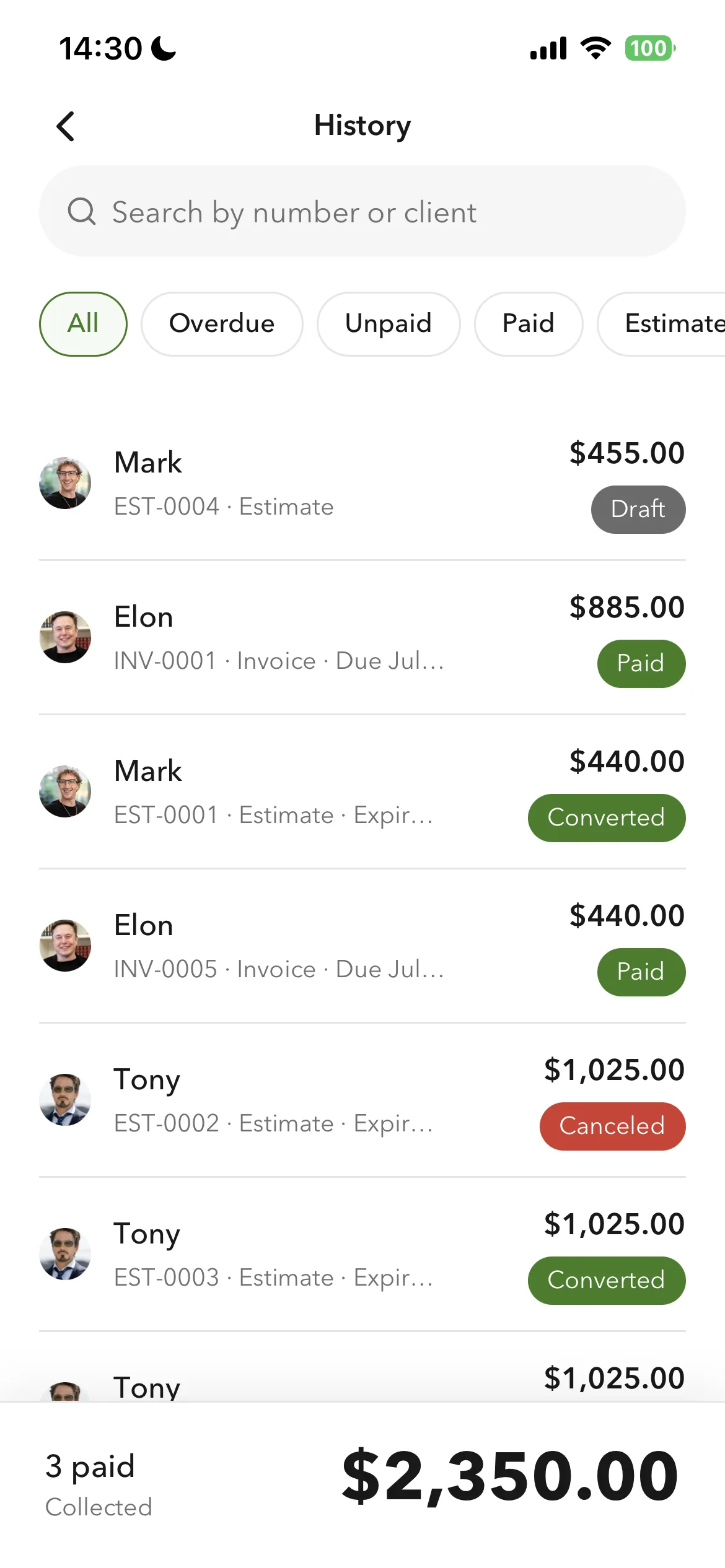
Billgami invoice history with paid, unpaid, and partial status on iPhone

FAQ

Common questions

What is the best invoice app for freelancers?

There is no single best. The Reddit thread that ranks first on Google for this query shows dozens of freelancers using dozens of different tools. Billgami's answer: if you invoice fewer than 30 times a month, want a fast PDF workflow, and prefer a real free tier with an optional lifetime tier ($249.99) instead of subscription-only apps, Billgami fits. If you need accounting depth or automated recurring billing, other tools fit better.

Does Billgami handle project-based vs hourly freelance invoicing?

Yes. Save both types of line items in your service library: a project scope line with a fixed total, and an hourly line with quantity + rate. Combine them on a single invoice when a project runs over-scope and adds hourly revisions.

Can I add a deposit or retainer to a freelance invoice?

Yes, as a line item on the estimate or invoice. Billgami does not have a dedicated deposit-tracking workflow, so you handle it as: send an initial invoice for the retainer, mark it paid when the client pays, then send the balance invoice at project end. Simple and transparent.

How do I invoice for freelance work without accounting software?

Billgami is designed for exactly this. You do not need QuickBooks or FreshBooks just to send professional PDF invoices. Save a client, drop in service line items, preview the PDF, share it, and mark paid when the money arrives. That is the full workflow.

Does Billgami process client payments or use Stripe?

No. Billgami never processes card payments and never uses an embedded payment processor. Clients pay you directly through the method you already prefer: Zelle, Venmo, wire, PayPal, check, or Stripe if you already have Stripe. Billgami only tracks the invoice status you mark manually.

Can I send a freelance invoice PDF from my iPhone?

Yes. That is the core Billgami workflow. Preview the PDF, share through email or iMessage, and the client receives a print-clean document readable on phone or desktop.

How does Billgami's lifetime tier compare to FreshBooks or QuickBooks subscriptions?

FreshBooks and QuickBooks Self-Employed both charge monthly. Over 3 years, a subscription can easily total more than several one-time app purchases. Billgami is one payment, keeps working, and never renews. See the pricing page for the current App Store price.

What if I need automated recurring invoices for retainer clients?

Billgami does not automate recurring invoicing. You duplicate the previous invoice, update the date, and send. If you have 10+ recurring retainer clients on strict monthly billing, a subscription tool with automated recurring is a fair pick. For most freelancers with a few retainer clients, manual monthly sending is one minute of work.

Can I use Billgami for freelance work internationally?

Yes. The PDF invoice format is universally readable. Billgami does not enforce a specific currency or tax formatting, so you set them per invoice. For international payment methods like Wise or PayPal, the client pays you directly through those tools and you mark the invoice paid.

How do I export my freelance invoice history for taxes?

Every invoice record is exportable. At tax time, export the full year, share with your accountant, or import into a spreadsheet. Billgami does not generate a Schedule C for you, but it gives you the underlying invoice records that any accountant or DIY tax tool can use.