Billgami
Simple invoice app

A simple invoice app that stays out of the way.

Billgami is an invoice app for iPhone built for solo service pros. Send professional PDF invoices, save clients, convert estimates in one tap, and track paid, unpaid, or partial status by hand. It is not accounting software, and customers pay you directly through the method they already use.

Before choosing an app, use our best invoice app comparison to match the product to your invoice volume and payment workflow.

For focused comparisons, review alternatives to Invoice Simple, Bookipi, and Invoice2go.

We also break down Billdu alternatives and Wave alternatives for people leaving client caps or broader accounting tools.

  • PDF invoices from iPhone in under a minute
  • Free tier plus lifetime option ($249.99) if you want to skip subscriptions
  • Estimates, invoices, and receipts in one workflow

Last updated · July 24, 2026

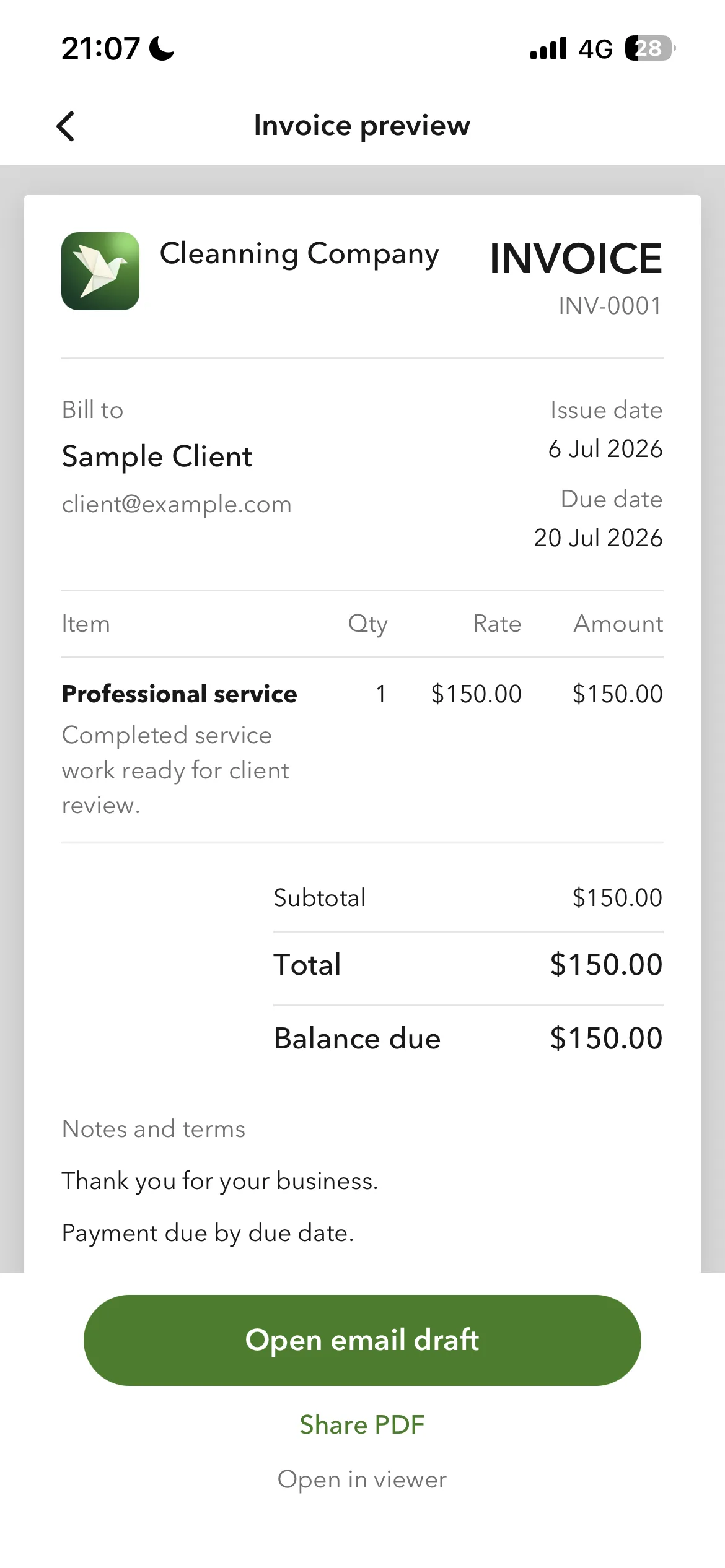
Billgami invoice preview on iPhone showing client, line items, total, and share PDF

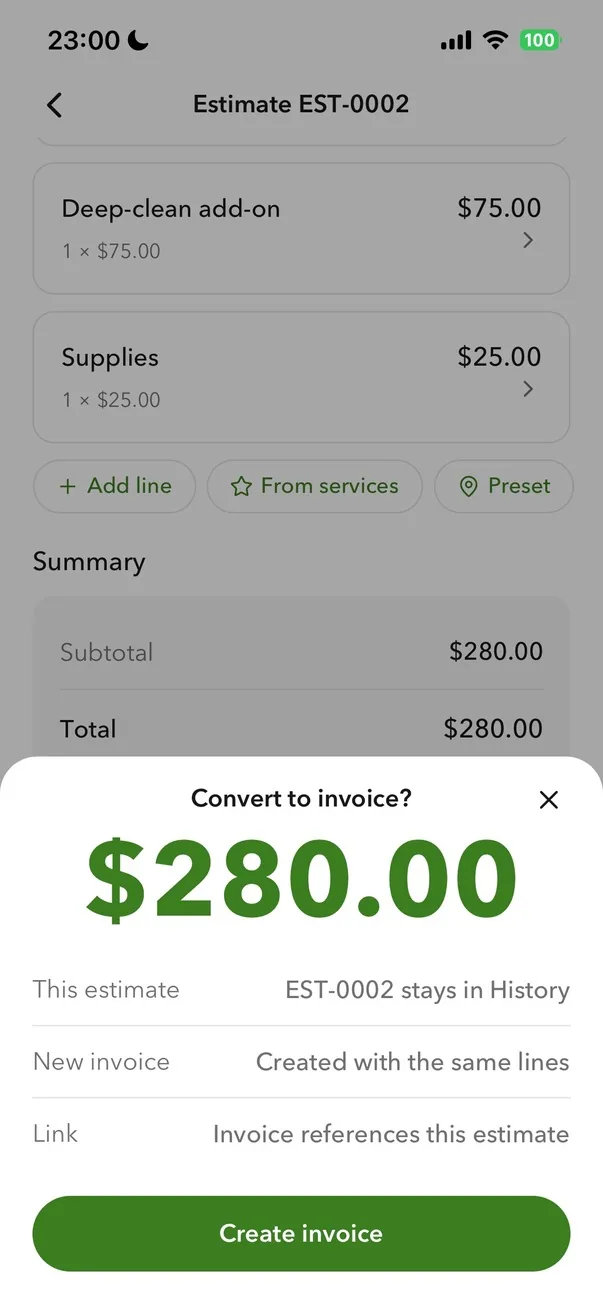
Estimate to invoice

Build the estimate on site, convert it when they say yes

Add line items with quantity and rate while you are still standing in front of the customer. When the job is approved, the estimate becomes an invoice in one tap. You are not retyping anything, and the numbers cannot drift between the two documents because they are the same record.

Billgami estimate screen with itemized lines and a convert-to-invoice action

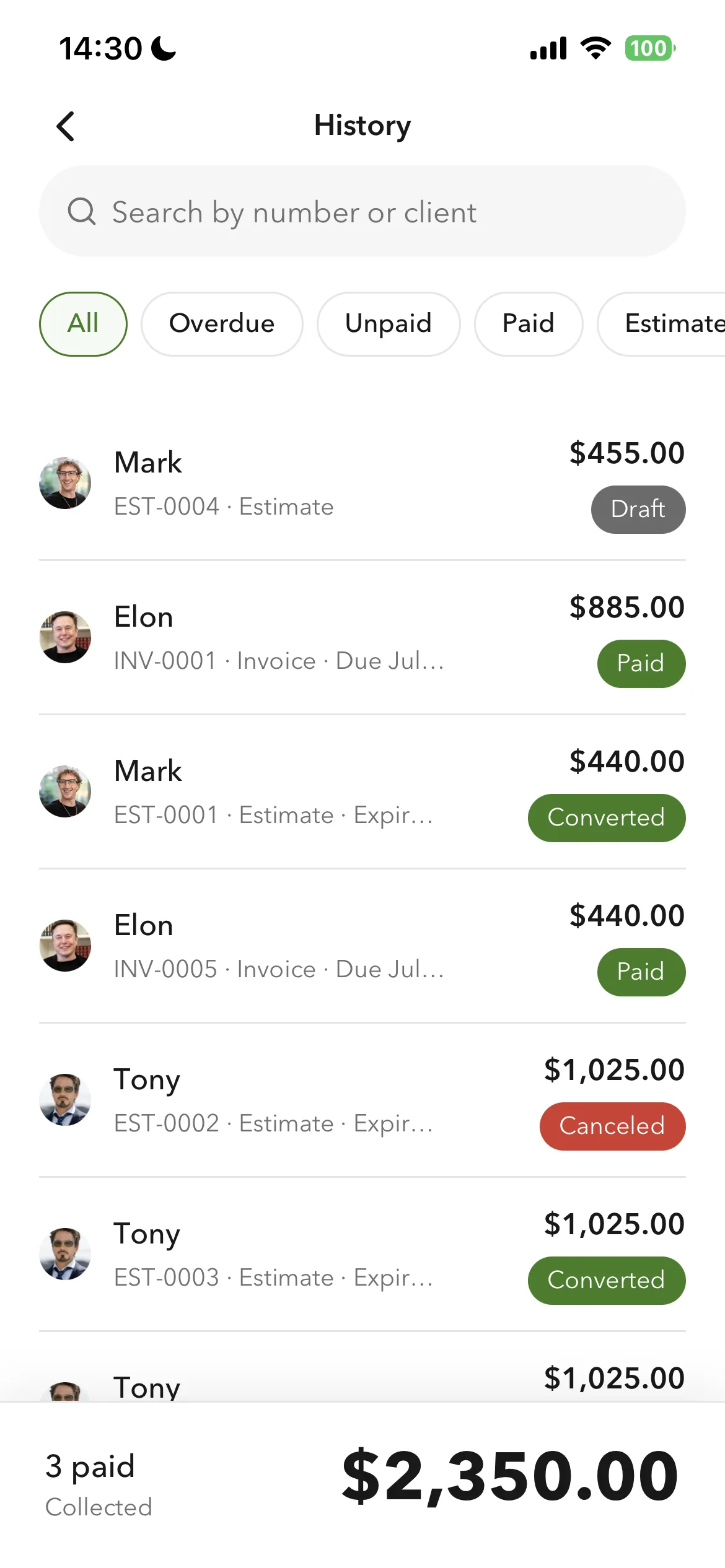
Status you control

Paid, unpaid, partial, and overdue, tracked by hand

You mark what has been paid. Billgami does not process payments and never touches your money, so nothing is guessed from a payment feed. The customer pays you the way they already do, and the record reflects what you know actually happened.

Billgami invoice history showing paid, unpaid, partial, and overdue statuses

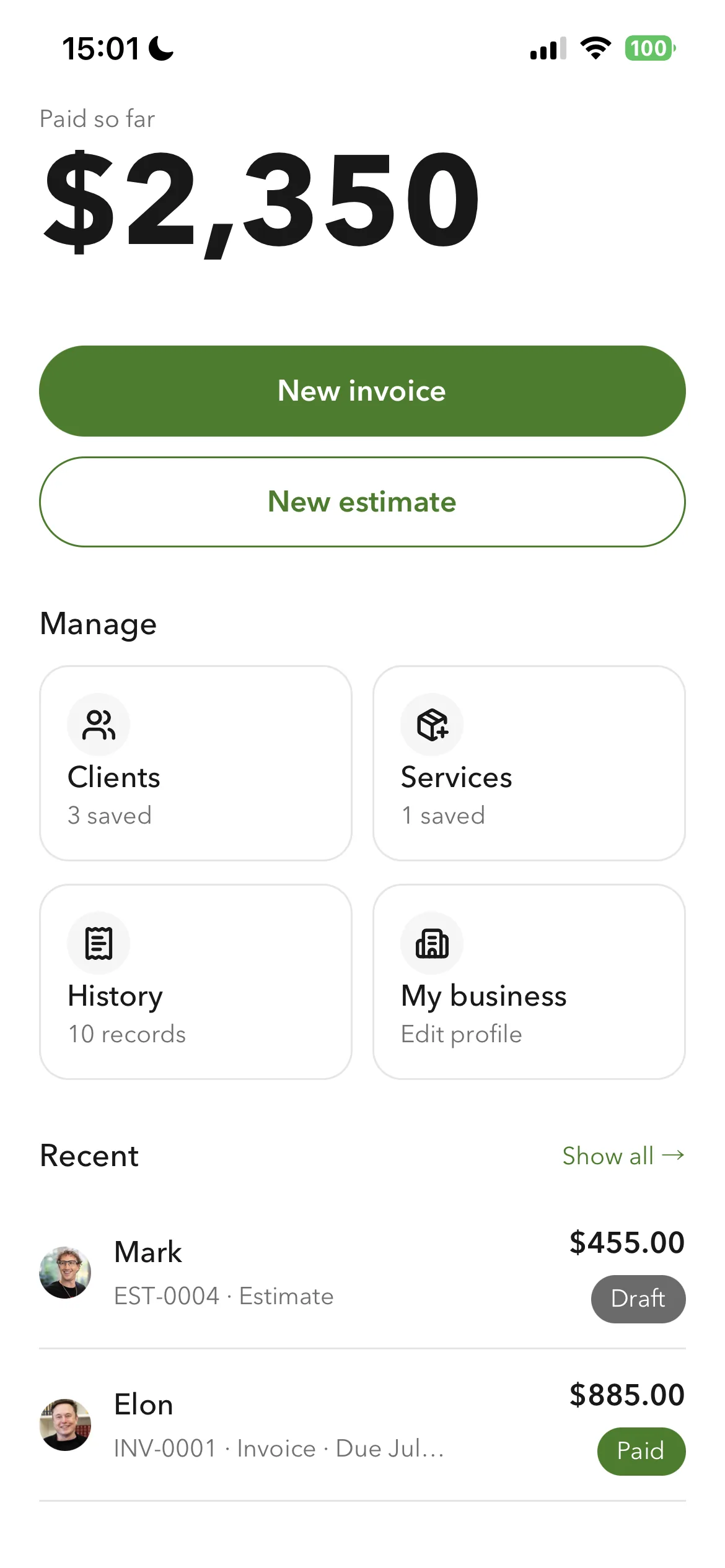
Reuse, do not retype

Saved clients and service lines make the second invoice fast

The first invoice takes real effort because you are entering a client and your services for the first time. Every invoice after that reuses them. That gap between the first and the second is the whole argument for using an app instead of a template, and it is measured further down this page.

Billgami home screen with saved clients and reusable service line items
01Sample

Sample invoice with real numbers

A filled-in example that mirrors what you would send a client. Every price is pulled from the industry data table below.

Invoice

Sample invoice created in Billgami

Invoice #

INV-2026-0142

A complete invoice for a house cleaning visit, filled in exactly the way Billgami builds it: a numbered header, itemized services with rate and quantity, a subtotal, an illustrative tax line, the total due, and a payment note. This is the document your client receives as a PDF.

DescriptionQtyRateTotal

Standard residential cleaning

3 bedrooms, 2 bathrooms, kitchen, living areas

1$180.00$180.00

Deep clean add-on: kitchen

Inside cabinets, appliance exteriors, backsplash

1$60.00$60.00

Interior windows

Ground floor, 8 panes

1$45.00$45.00

Inside oven

Degrease and wipe down

1$40.00$40.00

Eco-friendly supplies

Client-requested plant-based products

1$15.00$15.00

Travel fee

Round trip to service address

1$25.00$25.00
Subtotal$365.00
Tax$25.55 (illustrative 7%, confirm your local rate)
Total$390.55

Notes and terms

Payment due within 14 days of the service date. Pay by bank transfer, Zelle, check, or the method already agreed. Billgami does not process payments, so you are paid directly. Thank you for your business.

Example only. Line item pricing and sales tax vary by market, job scope, and business. Confirm your own pricing and local tax rules before quoting a client.

Who this is for

Billgami fits solo operators who send invoices themselves and want the fewest possible steps between finishing a job and getting paid.

  • Solo freelancers, contractors, cleaners, handymen, and landscapers
  • Side-hustle service pros invoicing on the go
  • One or two-person crews that share one iPhone workflow
  • Anyone tired of monthly subscription invoice apps

Who this is not for

Billgami is intentionally narrow. If you need any of these, a different tool fits better and Billgami will feel too light.

  • Crews of 10+ who need dispatch, routing, or field-service management
  • Businesses that need payroll, tax filing, or full bookkeeping
  • Anyone who needs the app to collect card payments or hold funds in escrow
  • Businesses that need automated recurring invoices or reminders as a core feature
02How it works

From first tap to paid record

Set up once, send the PDF, track it to paid. That is the whole loop, and the three steps below are everything there is to learn. There is no project board, timesheet, or client portal to configure first; if a feature would add a fourth step, it does not belong in this app.

  1. Billgami home screen on iPhone with saved clients and service line items ready to reuse
    1

    Set up once

    Save the client (name, address, contact, service notes) and build your library of service line items: house cleaning, trip fee, labor hour, materials markup. Every future invoice or estimate reuses both with one tap, so you never retype anything at the job site. Both libraries live on your iPhone, ready even without signal.

  2. Billgami invoice PDF preview on iPhone, ready to share through the share sheet
    2

    Send the PDF from your iPhone

    Drop saved lines into the invoice, edit the numbers per job, and the totals compute themselves. Share the PDF through the iPhone share sheet: email, iMessage, or any messenger. Works offline; the record queues locally until you have signal.

  3. Billgami invoice history on iPhone showing paid, unpaid, and partial payment status
    3

    Track it to paid

    When the client approves an estimate, one tap turns it into the invoice with nothing rekeyed. Mark paid, unpaid, or partial as money arrives through your existing method (cash, Zelle, check, card reader). Billgami never processes or holds the money, and the unpaid and partial lists double as your follow-up list for the week.

Head-to-head

Billgami vs Invoice Simple vs Bookipi vs QuickBooks

FeatureBillgamiInvoice SimpleBookipiQuickBooks
Made for solo service prosYesYesBroad focusNo, full accounting
PDF invoice from iPhoneYesYesYesYes
Estimate to invoice in one tapYesYesYesMulti-step
Save clients and service items for reuseYesYesYesYes
Manual paid / unpaid / partial statusYesYesYesAutomated only
Works offline at job siteYesPartialPartialNo
No accounting bloatYesYesGrowing suiteNo, full accounting
Lifetime option available ($249.99, no renewal)YesNoNoNo
No payment holdsYesYesYesN/A

If you are shortlisting the best invoice app for iPhone, this is the honest read: Invoice Simple and Bookipi are capable products with far more users than Billgami, and QuickBooks is the right answer when you genuinely need accounting. Comparison based on public App Store metadata and product pages as of July 2026. Every column reflects the product's own public positioning, not a claim about hidden features.

04Anatomy

What Billgami does

Six things Billgami actually ships, described honestly. If a competitor claims a feature that Billgami does not, we say so on this page instead of hiding it.

  1. 1

    Save clients once and reuse them forever

    Every client record lives in your device with name, address, contact, and notes. When you start a new invoice or estimate, you pick the client and every detail auto-fills. This is the single biggest time saver for repeat service work.

  2. 2

    Save service line items and drop them into any document

    Build a small library of the services you sell: standard cleaning, trip fee, labor hour, material markup. Adding a line item to an invoice becomes a tap, not a retype. Edit the numbers per job when the price changes.

  3. 3

    Send a professional PDF from iPhone in under a minute

    The PDF export is the core Billgami deliverable. Preview the document, tap share, and it goes out through email, iMessage, or any messenger your client uses. The PDF is print-clean and readable on both phone and desktop.

  4. 4

    Turn an approved estimate into an invoice in one tap

    When a client approves an estimate, one tap converts the same document into an invoice. The line items, client, and totals travel with it. No copy-paste, no lost context between the quote and the bill.

  5. 5

    Track paid, unpaid, and partial status manually

    Mark an invoice paid, unpaid, or partial as customers pay you through the method you already use. Billgami does not process or hold payments. The status is yours to control, so your records reflect reality, not an automated guess.

  6. 6

    Works offline at the job site

    Cellular signal is not always reliable. Billgami creates invoices, estimates, and PDFs offline; the records queue locally and sync when you have signal. The share sheet still works over local channels like AirDrop and iMessage relay.

05Tradeoffs

What Billgami leaves out, and what to use instead

Billgami is small on purpose. Each row below is something it does not do, next to the tool that does do it well. If you need one of these, use the app in the last column instead of stretching Billgami to fit.

What Billgami does not doWhy it is not hereUse this instead
Process payments or hold your moneyBillgami never sits between you and your customer, so there are no holds, disputes, or payout delays to manageSquare or Stripe, if you want customers to pay by card inside an invoice
Automatic payment remindersReminders need a send schedule and delivery tracking, which is a different product surfaceInvoice2go or Zoho Invoice
Recurring invoices on a scheduleThe app creates documents when you ask it to, not on a timerZoho Invoice or QuickBooks
Full accounting and bookkeepingCategorising expenses, reconciling bank feeds, and producing financial statements is a separate disciplineQuickBooks, Xero, or Wave
PayrollPayroll needs employee records and tax filings, which is a regulated problem of its ownGusto, or QuickBooks Payroll
Tax filingJurisdiction-specific and regulated; getting it wrong is expensiveA CPA, or dedicated tax software
Dispatch, scheduling, and technician routingThat is field-service management for teams, not paperwork for one personJobber or Housecall Pro
Time trackingBillgami records what you bill, not the hours you worked to get thereA dedicated time-tracking app, then bill the total here
CRM and sales pipelineSaved clients are records you reuse, not leads you nurtureA CRM, if you are managing a pipeline rather than repeat customers
How we sourced these prices · How we built Billgami

Billgami is built for a specific population: solo operators in service work who need invoice paperwork without accounting overhead. The scale is real. IRS Nonemployer Statistics count roughly 28 million US businesses with no paid employees, BLS Current Population Survey data puts 6 to 8 million solo operators in construction, cleaning, personal, and repair services, including about 2.5 million self-employed construction workers, and the Federal Reserve Small Business Credit Survey found 48 percent of small firms name administrative burden among their top three constraints. We studied App Store reviews across Invoice Simple, Joist, Invoice2go, Bookipi, and Housecall Pro alongside that data. The consistent pattern: solo pros want a fast PDF, stable pricing, and control over their records, and the common frustrations are subscription pressure, payment holds, and feature bloat. The shipped feature set is built directly against those pain points, and the tradeoffs table above lists what was deliberately left out.

  • Billgami shipped feature set as of the current App Store build, 2026-07-24
  • US Bureau of Labor Statistics, Current Population Survey, 2024
  • Federal Reserve, 2024 Small Business Credit Survey, published April 2025
  • US Internal Revenue Service, SOI Nonemployer Statistics, tax year 2022 (published 2024)
  • App Store public review data for Invoice Simple, Joist, Invoice2go, Bookipi, and Housecall Pro, 2025-2026
06Alternatives

Why solo service pros pick Billgami over the alternatives

Every incumbent in the invoice app category does something well. Billgami is not trying to beat all of them at everything. It makes one bet instead: the entire app is designed for service pros doing invoice paperwork, so every screen serves that single use case and nothing else competes for your attention. This section is honest about when to pick a different tool.

Billgami vs Invoice Simple

Invoice Simple is the strongest mobile invoice brand in the App Store: 4.9 stars, over 120,000 reviews, and a decade of accumulated features. For the core job a solo pro opens it for (clients, service items, estimates, PDF invoices, payment status) Billgami covers the same ground in an interface built around that single flow and nothing else. Their reviews' most common complaint is a user-experience complaint: paywalls appearing mid-flow. Billgami has one job and the screens to match.

When to pick Invoice Simple: You want card payments inside the invoice, the biggest install base, or template-heavy workflows, and you are comfortable with a subscription that may change over time.

Billgami vs Bookipi

Bookipi is a broader business app that has been adding AI features and expanding into adjacent workflows. That breadth is useful if you want one app for multiple business functions. Billgami is the opposite bet: the whole interface is optimized for one core use case, invoice paperwork for service work, so there is nothing to learn and nothing in the way. For solo service pros who like a narrow, predictable tool, Billgami's scope is intentionally smaller.

When to pick Bookipi: You want an AI-forward business suite and are OK with a growing feature surface area.

Billgami vs QuickBooks

QuickBooks is not a competitor to Billgami. It is a full accounting suite with tax, payroll, and bank feed integration, and it asks you to work through accounting concepts to get an invoice out the door. If you actually need bookkeeping, tax filing, or payroll, use QuickBooks. Most solo service pros do not need any of that just to send an invoice. Billgami sits before QuickBooks: the invoice paperwork tier, with an interface built for the job site rather than the back office.

When to pick QuickBooks: You have employees, real bookkeeping needs, or tax workflows that require accounting-grade software.

Try Billgami as your simple invoice app

Save clients, reuse service line items, send PDF invoices from iPhone, and stop paying for accounting features you never use. Free tier plus a lifetime option ($249.99) if you want to skip renewals.

Last updated: July 24, 2026 | Written by Phuc Doan

Billgami invoice history with paid, unpaid, and partial status on iPhone

FAQ

Common questions

Straight answers on what Billgami does, how it compares, what it costs, and how it works from your iPhone.

What makes Billgami a simple invoice app?

Billgami is scoped to six things: save clients, save service line items, send PDF invoices from iPhone, convert estimates to invoices, track manual payment status, and work offline. Nothing else. Every other invoice app either adds accounting features you may not need or hides invoice features behind subscription tiers. Billgami stays in one lane.

What is the easiest invoice app to use?

It depends on what you need the app to do. If you also run bookkeeping and payroll, the honest answer is that no lightweight app will be easiest for you; accounting software is the better fit. But if you are a solo service pro who just needs to send a clean invoice from your phone, Billgami is built to be the easiest invoice app to use: no accounting setup, saved clients and service line items, an estimate that becomes an invoice in one tap, and everything works offline from an iPhone. Having fewer features is the point, because that is what keeps it fast to learn and fast to send.

Is Billgami a free invoice app?

Billgami offers a lifetime tier ($249.99) alongside its free and subscription tiers rather than a free-plus-paywall model. See the pricing page for the current tier. The reason is honesty: many apps advertised as free either limit invoices per month, watermark PDFs, or push you into a subscription within a few days. Billgami charges once and stays out of your way.

How is Billgami different from Invoice Simple or Bookipi?

Invoice Simple is a subscription invoice app with a large template library. Bookipi is a broader business app expanding into AI-driven workflows. Billgami is narrower than both: solo service pros, six core features, and offers a real free tier and a lifetime tier ($249.99) alongside its subscriptions. The comparison table above lays out each row honestly.

Can I use Billgami without accounting software?

Yes. Billgami is designed to be the entire invoice paperwork layer for a solo service business that does not use QuickBooks, Wave, Zoho, or FreshBooks. It exports records so you can share them with an accountant at tax time if you use one.

Does Billgami process payments or hold my customer's money?

No. Billgami never processes card payments and never holds funds. Customers pay you directly through the method you already use: cash, check, Zelle, Venmo, card reader, or any other payment tool. Billgami only tracks the invoice status you record manually.

Is Billgami a free invoice app for iPhone?

There is a real free tier, so yes, you can use it as a free invoice app for iPhone without paying anything. Paid tiers are $14.99 monthly, $111.99 annual, or a $249.99 lifetime option if you want to skip subscriptions. The free tier is a genuine tier, not a timed trial that locks your records when it ends.

What makes a good invoice app for iPhone specifically?

Three things matter on a phone that do not matter on a laptop, and they are what separate a genuine iPhone invoice app from a web tool with a phone view bolted on. It has to work one-handed while you are standing somewhere, it has to work with no signal because job sites often have none, and the finished PDF has to leave through the iOS share sheet into whatever your customer actually uses, whether that is Mail, Messages, or WhatsApp. Billgami is an easy invoice app precisely because it is built around those three constraints and is iPhone-only, not a desktop product squeezed onto a small screen.

Can I send a PDF invoice from my iPhone offline?

Yes. Billgami creates PDFs offline; the record queues locally and syncs when you have signal. You can share the PDF through AirDrop or iMessage even without cellular signal in some cases. Once you are back on signal, email and cloud shares complete automatically.

How does the lifetime tier work?

The lifetime tier is a single $249.99 purchase through the App Store, and it is the option to take if you want to skip subscriptions. Monthly ($14.99) and annual ($111.99) tiers exist too, and there is a real free tier to start on. Whichever you pick, your invoice history, clients, and service items live on your device and stay exportable. See the pricing page for current tiers.

Is Billgami a replacement for QuickBooks?

No. QuickBooks is a full accounting suite with bookkeeping, tax, and payroll workflows. Billgami is not accounting software. If you need bookkeeping, keep QuickBooks and use Billgami for the invoice paperwork layer only. Many solo operators use both.

Can I use Billgami for freelance invoicing?

Yes. The client-save and service-line-item features work equally well for freelancers who invoice per project or per hour. See the dedicated freelancer page for a workflow tailored to freelance invoicing.

What if I need automated recurring invoices or reminders?

Billgami does not automate recurring invoices or send automatic client reminders. If those are core to your business, a subscription tool with those features fits better. Billgami is honest about its scope; the six features listed above are what ship.

Phuc Doan

Phuc Doan

Founder of Billgami·Last updated July 24, 2026

MethodologyThis page compares Billgami against the invoice apps it actually competes with, using each product's public App Store and website positioning as of July 2026, not private feature claims. Pricing figures are Billgami's own published tiers.