FAQ
What do electricians ask about invoice templates?
Clear answers on invoice templates, pricing, and how solo service pros send professional PDFs from a phone.
What should an electrician invoice include?
An electrician invoice needs your business name and license number, the customer name and service address, a unique invoice number and date, the permit number when the job was permitted, itemized labor and materials on separate lines, any code-required additions as their own labeled lines, any permit fee at cost, any deposit credited, the total due, and your payment terms.
Does an electrician invoice need a license number?
In several states, yes. Texas, California, and Florida all require the contractor's license or registration number on business documents, and Texas names invoices explicitly. Even where it is not strictly required, putting your license number on the invoice is what makes it read as legitimate to a homeowner or an inspector. Keep it in your from block on every invoice.
Why did my electrician charge me for breakers I did not ask for?
On a panel upgrade the electrical code usually requires AFCI and GFCI breakers, updated grounding, and sometimes a service disconnect, whether or not you asked for them. A good electrician itemizes these as their own labeled lines so you can see they were required by code, not chosen as an upsell. If they are buried in a lump labor charge, ask for them to be broken out.
What is an electrician service call fee?
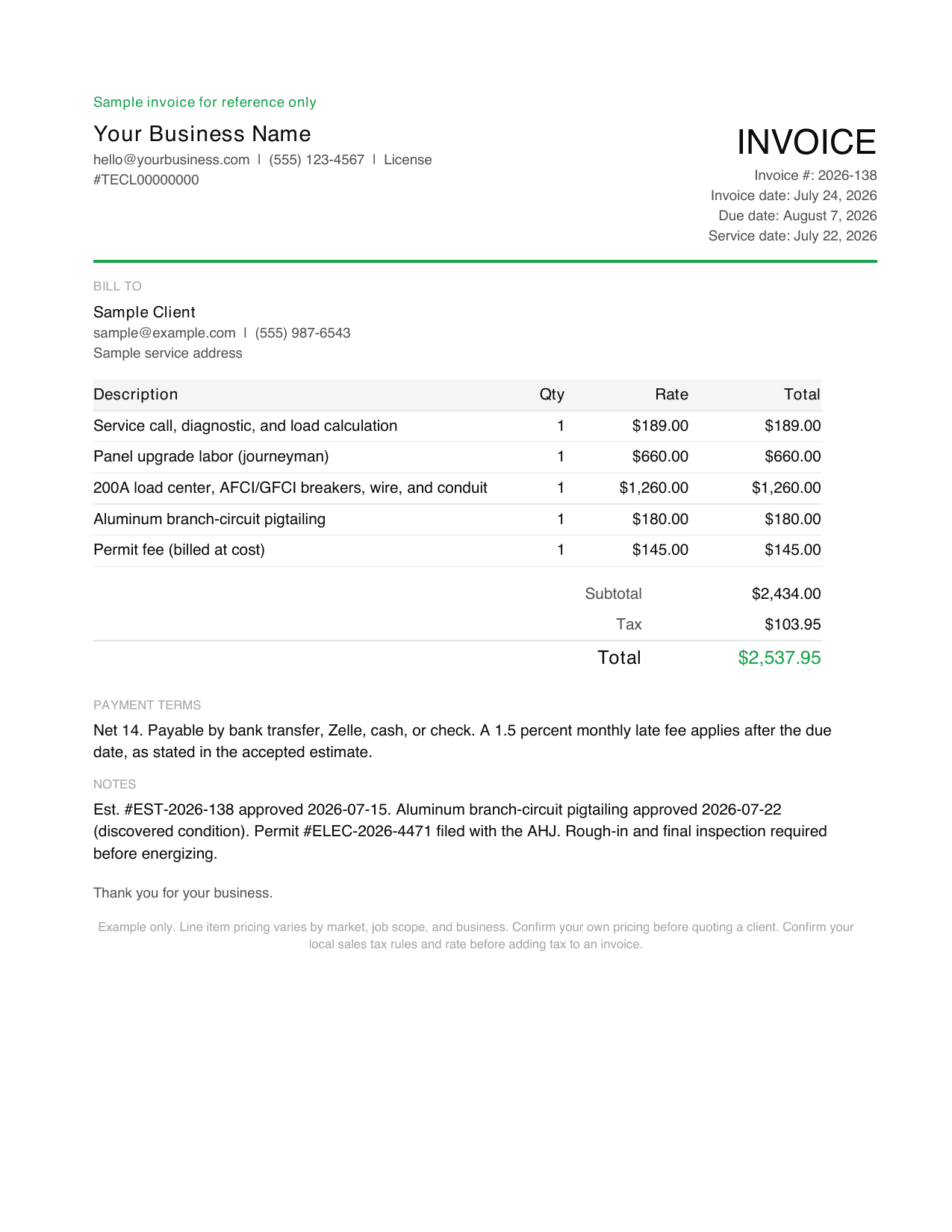
An electrician service call fee is the flat charge for coming to your property and diagnosing the problem, before any repair. It typically runs $75 to $200 for a standard call and more for after-hours or emergency visits, and it usually covers the trip plus the first diagnostic. A good electrician tells you on the estimate whether the service call fee credits toward the repair if you go ahead, so it is not charged twice. On the sample invoice above it is the first line.
How much do electricians charge in 2026?
It depends on license level and region. As a benchmark, service calls run $75 to $200, journeyman labor $85 to $130 an hour, a 200A panel upgrade $1,800 to $4,000, and an EV charger install $500 to $2,200. These are contractor bid rates and flat-rate job prices, not wages, so they carry the truck, tools, insurance, and licensing.
How do I bill for a discovered condition?
Stop when you find it, get a text or email approval before you correct it, then bill it as its own line on the invoice with the approval date referenced. The sample above shows this: aluminum wiring found behind the panel was pigtailed to copper and billed as a separate $180.00 line, approved 2026-07-22, never folded into the panel labor.
Do I charge sales tax on an electrician invoice?
Usually on materials and not on labor, but it varies by state, and some states tax neither on a capital improvement. Split labor and materials on the invoice so the tax base is obvious, keep permit fees out of the taxed subtotal because a government pass-through is not your revenue, and confirm your own state rule before you set it.
Should I put the permit number on the invoice?
Yes, when the job was permitted. The permit number is what lets a customer match your invoice to the inspection record, and inspectors expect to see it. On larger jobs, bill against inspection stages, rough-in and then final, and reference the stage each invoice covers.
Does Billgami track permits, inspections, or code compliance?
No. Billgami creates the invoice document, saves your customers and reusable line items, and lets you export and manually track it. It does not file permits, schedule inspections, dispatch technicians, process payments, or determine whether work meets code. For those you use your licensing board, your AHJ, and a dedicated field-service tool if you need one.
Is Billgami full accounting software?
No. Billgami is for invoices, estimates, quotes, receipts, PDF records, and manual status tracking. It is not tax, payroll, bookkeeping, or payment processing software.
Can I send PDFs from my iPhone?
Yes. Billgami is built around creating professional PDFs and sharing them through the iPhone share sheet or email workflows you already use.